“How much does a website cost?” No agency can answer that right away, and it frustrates clients. But you can’t answer “how much does a house cost?” either without knowing how many floors it has, what the walls are made of and whether you want a pool. A website’s price is the sum of specific stages of work — and once you understand those stages, it becomes much easier to compare proposals and keep the project under control.
In this article we’ll walk through how turnkey website development works: which stages a project goes through, how long each one takes, how the budget is split, and where clients most often lose time and money.
What “turnkey” actually means
A turnkey website means a single team owns the entire journey: from analyzing the task and planning the structure to launch, analytics setup and handover of access. The client doesn’t have to hire a designer, developer, copywriter and SEO specialist separately — and doesn’t become the go-between for all of them.
It’s important to understand that “turnkey” doesn’t mean “no client involvement.” Nobody knows your business better than you, so at key stages — the brief, prototype, design and content — you’ll be asked for answers and approvals. How quickly those approvals happen affects the timeline as much as the agency’s own work.
Development stages and timeline
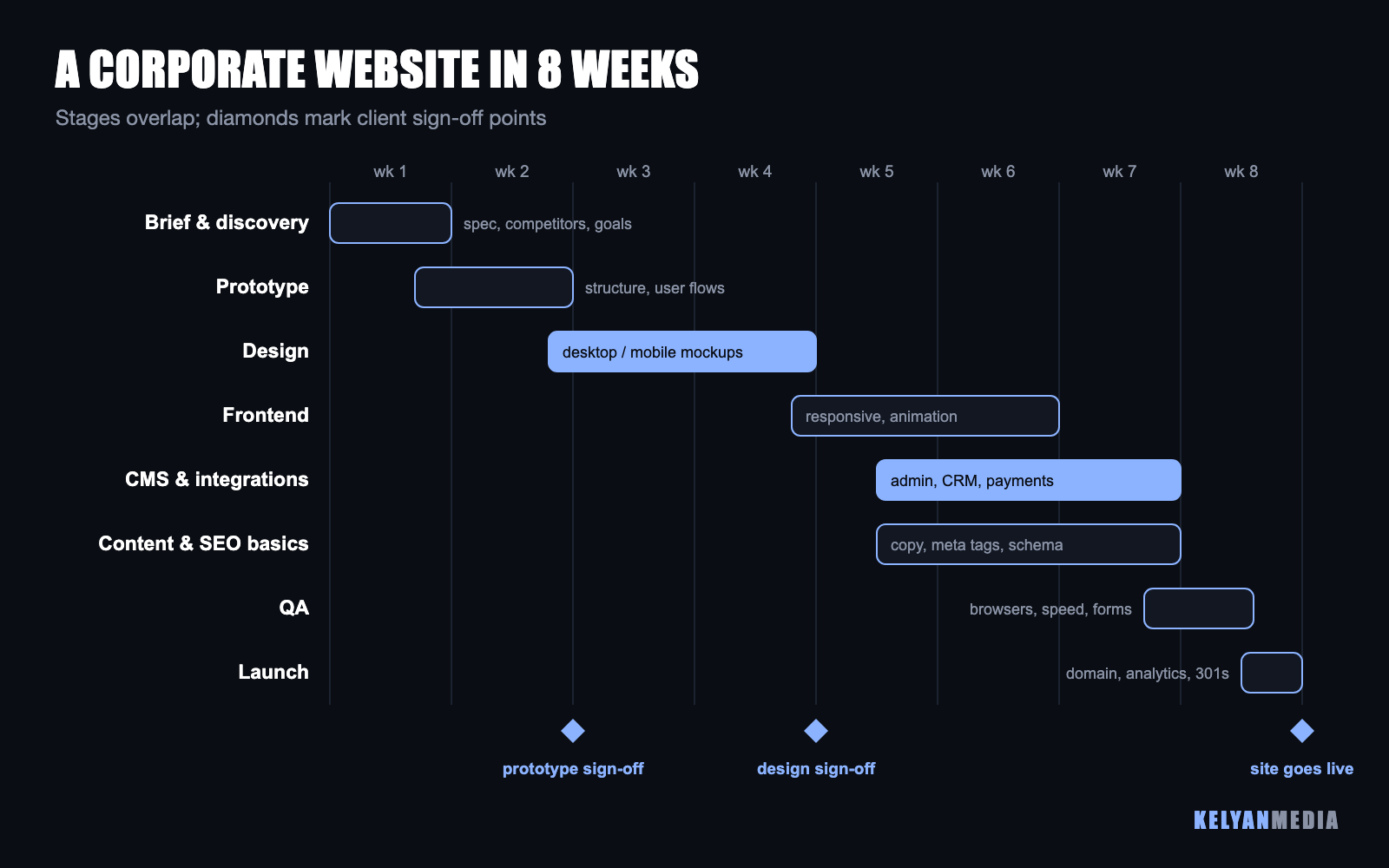
A typical corporate website of 10–20 pages with a service catalog, lead forms and CRM integration takes about eight weeks. The stages overlap: while the designer finishes the inner pages, the frontend developer is already building the homepage.
1. Brief and discovery (1 week)
We clarify the site’s goals (leads, sales, brand, hiring), the target audience, competitors and the scenarios that bring people to the site. The result is a specification: the list of pages, features, integrations and requirements.
2. Prototype (1–2 weeks)
A black-and-white layout of every page: which blocks, in what order, where the buttons and forms go. The prototype is the cheapest place to fix logic mistakes: moving a block in a wireframe takes minutes, reworking a finished design takes days.
3. UI/UX design (2–3 weeks)
The visual style, mockups of every page for desktop and mobile, button and form states, animations. If the company has a brand identity, the design builds on it; if not, this is where the site’s visual language is created.
4. Frontend development (2 weeks)
Turning mockups into code: responsiveness on every screen, animations, image and load-time optimization. Good frontend work isn’t just “looks like the mockup” — it’s also fast loading on mobile networks.
5. CMS, backend and integrations (2–3 weeks)
Connecting a content management system so you can edit copy, prices and news yourself. Integrations: CRM, online payments, messengers, delivery services, accounting. This is the most variable stage: a simple contact form and a full customer portal differ in effort by an order of magnitude.
6. Content and SEO basics (in parallel)
Copy, photos, meta tags, schema markup, URL structure and redirects from the old site. A site launched without SEO basics has to be reworked later — and that costs more than doing it right the first time.
7. QA and launch (1 week)
Testing across browsers and devices, checking every form and integration, load speed, analytics and goal setup, moving to the domain, 301 redirects from old URLs and submitting the sitemap to search engines.
Where the budget goes
Below is an approximate budget split for a corporate website by stage. Online stores spend noticeably more on backend and integrations; landing pages spend more on design and copy.
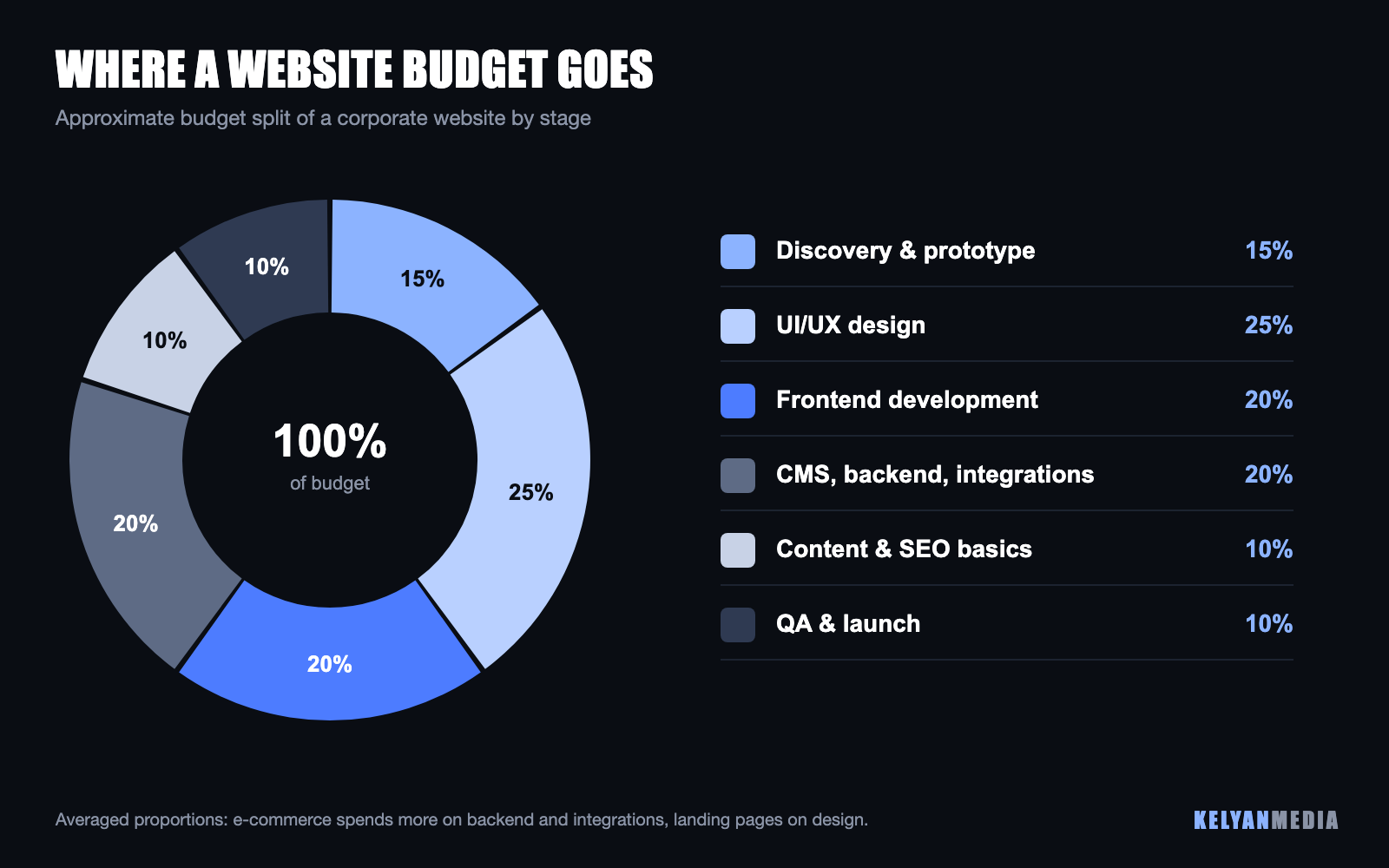
Almost half the cost goes into things the client never sees directly on the finished site: discovery, prototyping, integrations and testing. These are exactly the stages that cheap contractors “save” on — and exactly why their sites later fail to generate leads or break after the first update.
Which type of website to choose
| Website type | Best for | Approximate timeline |
|---|---|---|
| Landing page | A single service or product, an ad campaign, testing demand | 2–4 weeks |
| Corporate website | A company with several business lines, services or branches | 6–10 weeks |
| Online store | Product catalog, cart, payments, delivery, inventory integration | 10–16 weeks |
| Portal or web service | User accounts, complex logic, large volumes of data | 3–4 months and up |
A common mistake is ordering a landing page when the company has five business lines and trying to squeeze everything onto one page. Such a site ranks poorly in search and confuses customers. The opposite mistake is building a complex portal to test a hypothesis that a simple landing page could validate in a couple of weeks.
Where clients lose time and money
- No content when frontend work starts. Copy and photos get postponed “for later,” and the finished site sits with placeholders for weeks. The fix: gather content in parallel with design.
- Slow approvals. Every week spent waiting for design feedback pushes back the whole project. Appoint one person with decision-making authority.
- Changes after sign-off. Reworking an approved prototype or design is the most expensive kind of change. Show the prototype to everyone who will influence the decision at that stage.
- Cutting QA and SEO basics. A site without analytics, redirects and meta tags loses the old site’s rankings and gives your ads no data to work with.
- No post-launch plan. A website is a tool, not a finish line. Without advertising, SEO and regular updates, even the most beautiful site won’t bring in customers.
Checklist before you start
- Write the site’s main goal in one sentence, for example: “generate 50 leads a month for service X.”
- Collect 3–5 competitor websites and 3–5 websites you like (not necessarily in your industry).
- Decide who in the company will approve the prototype, design and copy.
- Prepare your logo, brand guidelines, photos and company materials.
- List the integrations you need: CRM, payments, messengers, accounting, delivery.
- Decide who will manage the site after launch and whether CMS training is needed.
With these answers, an agency can give you an accurate estimate, and you can compare proposals from different studios on equal terms.
The KelyanMedia team builds corporate websites, landing pages and online stores turnkey — with SEO basics, analytics and integrations from day one. To get a timeline and cost estimate, fill out our website development brief.
FAQ
How much does turnkey website development cost?
It depends on the type of site, the number of unique pages, design complexity and integrations. An accurate estimate is only possible after a brief: two “corporate websites” can differ in scope several times over.
Can a website be built faster than 8 weeks?
Yes — by reducing scope (launching key pages first and adding the rest later), using an existing design system, or approving stages quickly. A simple landing page can realistically launch in 2–3 weeks.
Will I be able to edit the site myself after launch?
Yes. The site is connected to a CMS where you can change copy, prices and photos and add news without a developer. After launch we provide training and written instructions.
What does post-launch support include?
CMS and plugin updates, backups, uptime and security monitoring, and minor improvements. Regular updates are especially important: outdated plugins are one of the main reasons websites get hacked.